


Project Profitability
Total visibility into the data behind your projects.
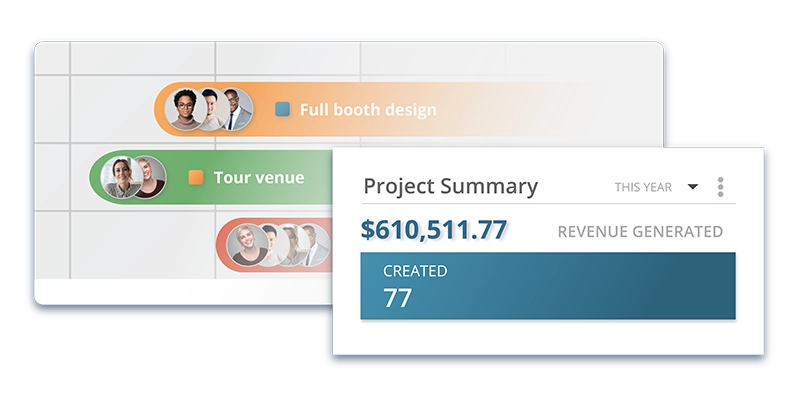
Turn Every Project Into Profit
Generate detailed financial reports to gain insights into every job’s profitability and make informed business decisions. Striven gives you the tools to know what works, and the agility to refine all of your projects
- P&L, Expense Reports
- Integrated Accounting
- Custom Dashboards
- Role Based Access Controls
What Can Striven Do For You?
P&L, Expense Reports
Striven’s reports provide detailed views of your company’s total income and expenses with both accrual and cash basis reporting options, allowing you to drill into specific details by clicking on hyperlinked dollar amounts.
Integrated Accounting
Eliminate the need to jump between multiple software applications, ensuring all financial data flows seamlessly between departments for real-time accuracy and consolidated reporting.
Custom Dashboards
Striven provides customizable dashboards with 3 adjustable columns that allow users to select and arrange widgets based on their specific role and business needs, creating personalized views of key metrics and information.
Role Based Access Controls
Striven’s role-based access control system uses configurable user roles with granular permissions that determine which employees can access sensitive customer, vendor, or company financial information.

“Striven has been, by far, the best ERP software I’ve used in 25+ years.”
“Their support has been amazing. “
—Darin B., Business Owner/Founder
Real Results: Striven Customer Testimonials
Hear directly from real customers about how Striven has transformed their business operations.
Discover how companies like yours have overcome operational challenges and achieved real, measurable results.

Trusted by users and experts alike.




Ready to try it? Start here.
Frequently Asked Questions
-
What is Striven’s Project Profitability feature?
+
The Project Profitability Report shows how much profit your projects are estimated to make and how much each project will cost to complete. This comprehensive reporting tool helps you track financial performance across all your projects, ensuring you maintain healthy margins and make data-driven decisions about project management.
-
What insights can I gain from project profitability reporting?
+
Understanding profitability isn’t just the core question: how much money did we make from this project? It can also give you insight about how (and whether) you should approach projects like it in the future. The reporting helps you:
- Identify your most profitable project types
- Understand which costs impact margins most
- Make informed decisions about future project pricing
- Learn from your mistakes, go after winning projects, and adjust your processes for the future
-
What expense categories are included in profitability calculations?
+
By default, Cost Of Good Sold and Labor are added to the report. However, you can configure additional expense columns including:
- Labor hours (pulled from submitted timesheets)
- Cost of Goods Sold
- Bills/Bill Credits
- Checks
- Credit Card Charges/Refunds
-
What key metrics does the Project Profitability Report show?
+
The report displays several critical financial metrics:
- Customer-Project: Customer name and project identification
- Status: Project status (Pending, In Progress, Done, Canceled, Reviewed)
- Order Total: Sum of all sales orders associated with the project
- PO Total: Sum of purchase orders linked to the project
- Revenue: Amount invoiced from sales orders
- Total Cost: Totals up the configured Project Expense columns to illustrate the total costs associated with the Project
- Profit: Totals up the Project’s revenue and the total cost to illustrate how much profit the Project stands to make
- Profit Margin %: Shows the profit margin of the Project as a percentage
- Profit %: Shows the profit of the Project as a percentage
-
Can I customize which expense categories are included in my profitability calculations?
+
Yes! You can configure which Expense columns you would like to include in the Total Cost calculations. This flexibility allows you to tailor the profitability analysis to match your specific business accounting practices and project cost structures.
-
How does Striven track labor costs for project profitability?
+
Labor shows how many labor hours are associated with the Project. This total is pulled from timesheets submitted by users. When configuring your report, you can choose which timesheet items to include in the labor cost calculations, ensuring accurate project cost tracking.
-
Can I drill down into the financial details of each project?
+
Absolutely! The Sales Order Total, PO Total, Revenue, and Expense column amounts are linked to view details of the transactions that make up this total. Clicking on one of these column totals will trigger a new browser tab to display with a list of the transactions that make up that total amount from the report. You can even click on individual transactions for deeper analysis.
-
How does project profitability integrate with other Striven features?
+
Striven doesn’t just connect your team and increase project profitability. It also integrates with all of your divisions, company-wide. The project profitability tracking seamlessly connects with:
- Sales order management
- Purchase order tracking
- Timesheet and labor tracking
- Accounting and invoicing
- Customer relationship management
Striven's Got You Covered
Whatever your business, Striven is here for you, making your project management a breeze.