


If you run a sign shop and you’ve done any research on management software, CoreBridge has probably come up. It’s a recognizable name in the space, used by several sign franchises and designed with the specifics of custom sign and print production in mind. That’s a real accomplishment, and it’s worth acknowledging.
But “industry-specific” doesn’t necessarily mean “everything you need.” And for sign shops that have outgrown the patchwork of tools they started with, the question worth asking is: how much of your business does your software actually cover?
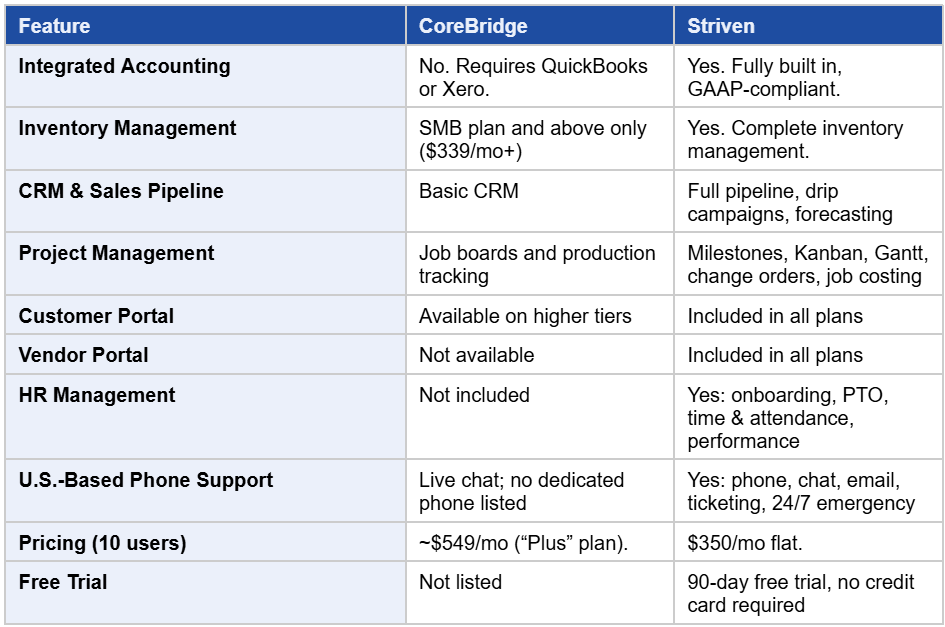
This comparison breaks down how CoreBridge and Striven stack up across the areas that matter most to growing sign companies.
What CoreBridge Does Well
To be fair, CoreBridge’s estimating tools are genuinely strong. The platform is designed around the complexity of custom sign work: building accurate quotes with material costs, labor rates, and overhead baked in. Its digital job board gives production teams a good picture of where every job stands, from design to fabrication to delivery. It’s cloud-based and mobile-accessible.
Where it gets more complicated is everything outside of those core workflows.
The problem isn’t what CoreBridge does. It’s what it doesn’t do, and what it forces you to manage elsewhere. A sign company is not just a production operation. It’s a business with books to keep, employees to manage, customers to retain, and inventory to control.
CoreBridge handles one of those things well and outsources the rest to other software.
Striven: A True All-in-One ERP for Sign Companies
Striven is an all-in-one ERP platform built for growing small and mid-size businesses, with a dedicated solution for sign creation and installation companies. It brings accounting, CRM, inventory, project management, customer/vendor portals, and HR into a single connected system with no external software required and no features gated behind tiers designed to extract more revenue per user.
Jason Randall, owner of City Beautiful Signs & Graphics in Central Florida, ran his sign company on CoreBridge (for estimates), QuickBooks (for accounting), HubSpot (for CRM), Dropbox (for files), and Trello (for projects). He was paying over $800 a month across those tools, and his team was constantly losing time re-entering data between systems that couldn’t communicate. After switching to Striven, the entire stack was replaced with one platform, and his shop went fully operational in 60 days.
The Accounting Gap
CoreBridge integrates with QuickBooks and Xero. That’s useful, but it also means your accounting lives in a separate system. When a job closes in CoreBridge, data has to flow to QuickBooks for invoicing and reconciliation. If something goes wrong in that handoff, or someone forgets a step, your financial picture is incomplete.
For a shop owner who wants to see job profitability in real time, pulling from two systems is an extra step that introduces friction and the possibility of error.
Striven takes a different approach. Accounting is built into the platform, not bolted on through an integration. When a quote converts to a job and that job completes, the invoice is ready to generate inside the same system. When it’s paid, your general ledger updates automatically. AP, AR, bank reconciliation, and financial reporting are all part of the same data environment as your CRM and job management. There’s no sync to run and no second login to check.
Jason Randall, owner of City Beautiful Signs in Central Florida, previously ran his shop on CoreBridge for estimates alongside QuickBooks, HubSpot, Dropbox, and Trello. After switching to Striven:
“The breaking point was realizing how much time we were spending managing software instead of managing projects and clients.” —Jason Randall, Owner, City Beautiful Signs & Graphics
CRM & Sales Pipeline
CoreBridge includes basic CRM functionality: customer records, communication tracking, and order history. That covers the fundamentals, but it stops short of a full sales pipeline.
Striven’s CRM includes pipeline management with visual dashboards, opportunity tracking, marketing drip campaigns and automated follow-ups, sales forecasting, and referral source reporting. For a sign shop that wants to grow its commercial account base or track which industries generate the most profitable work, that level of visibility matters.
When a sales opportunity closes in Striven, it converts directly into a job. No re-entering customer information, no copy-pasting quote details. The data flows through.
For sign companies actively growing their commercial account base, that level of visibility makes a real difference. You can see which industries generate your most profitable work, which campaigns are converting, and where deals are stalling, all without leaving the platform you use to run your shop.
Inventory Management
CoreBridge does include inventory functionality, but it is gated. The Starter plan ($129/month for 3 users) does not include inventory control. You need to step up to the SMB plan ($339/month) before inventory management, vendor purchase orders, and job costing become available. For a small or mid-sized sign shop trying to keep costs in check, that tiering forces a meaningful price jump just to access features that should be standard.
Striven includes real-time inventory management across multiple locations in its Standard $35/user/mo. plan, with no tier restrictions. Track vinyl rolls, substrates, inks, hardware, and finished products. Set automatic reorder points so you’re never caught mid-job without critical materials. Use barcode scanning and serial number tracking for specialized components. Every inventory transaction connects to the job it supports and the accounting entry it generates.
Project Management
Sign work is project work, and Striven treats it that way from start to finish. Every job in Striven has a full project structure: milestones and target dates, assigned tasks with due-date alerts, document storage for design files and permits, time tracking tied directly to job costing, and change order management that keeps customers informed when scope shifts.
Teams can view projects in Kanban boards, Gantt charts, or list format, whichever works best for a given role. Production staff can update job status from a tablet on the shop floor. Managers see the real-time picture across every active job from a single dashboard. Office staff see the same data the installation crew updated five minutes ago.
Because project management is connected to accounting in Striven, every labor hour logged and every material pulled against a job feeds directly into profitability reporting. You don’t have to wait until a job closes and the accountant runs the numbers in a separate system. Pull a profitability report on any active job at any point and see exactly where you stand.
“From the first customer interaction to final invoice and reporting, everything lives in one place.“ —Jason Randall, Owner, City Beautiful Signs & Graphics
Customer & Vendor Portals
Every Striven plan includes Customer and Vendor Portals at no additional cost. Your customers can log in 24/7 to view quotes, approve designs, check order status, review invoices, and pay by credit card or ACH, without a single phone call to your office.
The Vendor Portal works the same way on the supplier side. Your substrate vendors, hardware suppliers, and installation subcontractors can view purchase orders, submit bills, and stay updated on their own, which means fewer calls, fewer emails, and fewer interruptions to your production workflow.
A G2 reviewer put the value of Striven’s all-in-one approach clearly:
“Striven brings everything we need into one place. It handles CRM, project management, accounting, HR, and inventory without needing separate tools. The biggest benefit is how much time and money it saves while keeping our operations organized.“
Support: Who Picks Up the Phone
CoreBridge offers live agent chat and email support across all tiers. A dedicated support team is available at the Professional and Enterprise levels.
Striven’s support team is 100% in-house and U.S.-based, reachable by phone, live chat, email, and help desk. That means when your team has a question during a busy production week, you’re talking to someone who can actually resolve it, not escalating through a ticket queue. Striven has won Best Customer Support awards on both G2 and Capterra, and that reputation is consistent across plan levels, not reserved for top-tier subscribers.
A Software Advice reviewer described the experience this way:
“Technical support at Striven is excellent and you have multiple options for how to access help and information.”
Another noted:
“The Striven onboarding team was fantastic. They answer our questions quickly and accurately and we have had essentially zero hiccups along the way.”
Pricing: A 10-User Shop Comparison
For a 10-person sign shop, here’s what the numbers look like side by side.
On CoreBridge, a 10-user operation falls under the Plus plan at $549 per month, plus a one-time onboarding fee. That plan includes full automation, custom dashboards, and vendor management, but you’re still paying separately for QuickBooks ($50-80/month depending on your plan) and any HR tool you’re using. Realistically, you’re looking at $650 to $700 per month before accounting for implementation costs.
On Striven, 10 users on the Standard plan runs $350 per month, flat. No separate accounting software. No separate HR tool. Accounting, CRM, inventory, project management, HR, customer portals, and vendor portals are all included. That’s a savings of $300 or more per month, over $3,600 a year, while actually gaining more functionality.
One Striven customer who switched from a similar ERP setup calculated they were saving $40,000 annually after consolidating. At that scale, the ROI case is straightforward.
Who Should Consider Making the Switch
If you’re a CoreBridge user who is satisfied with your QuickBooks setup and running a shop small enough that the tiering hasn’t become an issue, CoreBridge may still be working for you. It’s a capable production management tool.
But if any of the following describes your situation, Striven is worth a serious look:
You’re paying for CoreBridge plus QuickBooks plus at least one other tool and spending real time reconciling data between them. Your team is re-entering information that should flow automatically between systems. You want to see job profitability in real time without pulling reports from two different platforms. You’re growing and need HR, more sophisticated CRM, and complete inventory management without jumping to a higher-priced tier. You’re tired of paying for software complexity instead of software value.
Striven offers a 90-day free trial with no credit card required. You can also book a demo and get a walkthrough built around your shop’s specific workflow.
See Striven’s sign industry solution: https://www.striven.com/solutions/industry/sign-industry-management-software
Read Jason Randall’s full story: https://www.striven.com/success-stories/sign-creation-installation
Feature Comparison