erp system Archives - Page 4 of 14 - Striven

Striven Integrates with Stripe for Seamless Payment Processing

We’re thrilled to announce an exciting development for Striven users: the integration of Stripe, a leading technology platform for online payment processing and financial solutions. This is not just a technical integration—it represents a significant leap forward in how businesses can manage their financial transactions in Striven with ease, security, and global reach.

Why Stripe?

Stripe stands at the forefront of the payment processing industry, renowned for its innovative technology that supports a myriad of payment methods. From credit and debit cards to mobile wallets and ‘buy now, pay’ later services, Stripe’s versatility is unmatched. It’s designed to fit the needs of businesses of all sizes, anywhere in the world, supporting over 135 currencies and available in more than 45 countries.

Like Striven, Stripe offers its users transparent and straightforward pricing models. Learn more about Stripe’s pricing model right here.

The Impact on Striven Users

For businesses leveraging Striven’s comprehensive business management platform, the integration with Stripe means a seamless, secure, and efficient payment processing experience for both you and your customers. Here are some of the key benefits:

  • Global Reach with Local Comfort: Accept payments in over 135 currencies, allowing you to expand your market reach without worrying about currency barriers.
  • Diverse Payment Options: Meet your customers wherever they are, offering the payment methods they prefer and trust, whether it be credit cards, debit cards, or mobile wallets.
  • Streamlined Accounting: Automatic recording and documentation of payments within Striven, simplifying your accounting processes and ensuring accuracy.
  • Transparent Pricing: Stripe offers straightforward and transparent pricing, ensuring businesses can plan and budget with confidence, without fear of hidden fees or complex pricing structures.

Looking Ahead

This integration underscores our commitment to providing tools that not only enhance the ease of financial management within Striven, but also empower businesses to grow and compete on a global scale. The collaboration between Striven and Stripe is a testament to our dedication to your business’s success, ensuring that managing your finances is as effortless as it is secure.

We’re excited for our users to experience the benefits of this integration, furthering our mission to support businesses in their growth and operational excellence. For more detailed information on how to leverage this integration to its full potential, we encourage you to visit Striven’s Stripe Integration Guide.

QuickBooks Desktop is Sunsetting: What Businesses Should Know

By now you should have heard that Intuit is making significant changes to their QuickBooks product offerings. After May 31, 2024, if you are not already a U.S.-based QuickBooks Desktop customer, new purchases of Desktop Pro and Desktop Premier are going away. New customers, however, can still buy a yearly Desktop Enterprise 2024 subscription.

For current QuickBooks Desktop customers, on May 31, 2024, Intuit is discontinuing all 2021 Desktop versions as they continue to nudge QB Desktop customers into their online, cloud-hosted version called simply, QuickBooks Online. QBO for short. More on that later.

Here is the complete list of QuickBooks Desktop 2021 on the chopping block:

  • QuickBooks Desktop Pro 2021
  • QuickBooks Desktop Premier 2021 (General Business, Contractor, Manufacturing & Wholesale, Nonprofit, Professional Services, and Retail)
  • QuickBooks Enterprise Solutions 21
  • QuickBooks Premier Accountant Edition 2021
  • QuickBooks Enterprise Accountant 21
  • QuickBooks Desktop for Mac 2021
  • QuickBooks Desktop Point of Sale 19.0 is going away as well on October 3rd, 2024.

It’s important to know that access to those indispensible services you’ve been using via QuickBooks Desktop 2021 software will be discontinued after May 31, 2024. These include:

  • Online Banking
  • Online Backup
  • QuickBooks Desktop Payroll
  • Desktop Payments
  • Live technical support

For a complete list of services being sunset, check out Intuit’s QuickBooks Desktop service discontinuation policy

Any business using QuickBooks Desktop 2021 should have an actionable plan before all these services suddenly disappear along with critical security updates that help protect your business from cybertheft.

What are your options to replace Desktop 2021 QuickBooks?

Option: Move to QuickBooks Online 

If you were to contact Intuit about your options to replace QB Desktop 2021, they would likely point you toward QuickBooks Online. QBO has been around since 2004, long before cloud-hosted software became so prevalent in recent years. 

When QBO was first made available to consumers, many customers who switched over from previous Desktop versions of QuickBooks reported that QBO initially lacked many core features as compared to QB Desktop software. 

Over the years, QuickBooks Online has evolved significantly, adding various features and integrations to better serve its users’ needs.

Cloud-hosted business management software platforms, often referred to as Enterprise Resource Planning software (ERP), can offer benefits over traditional on-premises (desktop) apps. Security, accessibility, data backup, scalability, cost efficiency—all required components for running today’s business.

Before you pull the trigger to migrate from QuickBooks Desktop to QuickBooks Online there are several considerations to take into account to ensure a smooth transition and to leverage the benefits of cloud-based accounting software. Here are key points to be aware of:

  • Feature Differences: QuickBooks Online and QuickBooks Desktop offer different sets of features. Before moving, evaluate if QuickBooks Online meets all your business needs. For example, some industry-specific features in QuickBooks Desktop may not yet be available in the online version.
  • Data Migration Limits: When migrating data from Desktop to Online, note that not all data may transfer seamlessly. Detailed transaction history, custom reports, and certain types of attachments may not migrate. Review what data will and will not transfer to plan accordingly.
  • User Interface and Workflow Changes: The UI and workflows between the two versions differ. QBO users will need to adapt to the new layout and navigation in QuickBooks Online.
  • Subscription Pricing: QuickBooks Online operates on a subscription model, which is different from the one-time purchase or annual subscription for QuickBooks Pro, Premier, and Enterprise desktop versions. Investigate the ongoing monthly or annual costs for the online version.
  • Internet Dependency: QuickBooks Online requires a stable internet connection for access. Make sure your internet reliability and speed will support using cloud-based software effectively.
  • App Integrations: QuickBooks Online often integrates with a broader range of third-party apps and services than its desktop counterpart. Review and consider any changes needed to your current tech stack.
  • User Access Levels: QuickBooks Online allows for different levels of user access and multiple users to access the account simultaneously from different locations. Plan your user access levels and who needs what level of access in your organization.
  • Security and Data Backup: While QuickBooks Online offers strong security measures and automatic backups, understand how Intuit protects your data and what responsibilities you have, such as managing user access and passwords.
  • Training and Support: Intuit and various third-party providers (ProAdvisers) offer tutorials, webinars, and customer support for QBO.
  • Review and Clean Up Data: Before migrating, it’s a good practice to review your QuickBooks Desktop data for any errors or unnecessary information. Cleaning up your data can simplify the migration process and improve your accounting practices in QuickBooks Online.

There is always a tradeoff in any business decision, and only you can ultimately determine what the best course of action for your business is. Be clear about both the upside and downside of the transition from QuickBooks Desktop to QuickBooks Online to minimize potential disruptions to your business operations.

Option: Renew your 2021 QB Desktop software to the latest version.

Before May 31, 2024, if QuickBooks Online doesn’t meet your needs, or you feel you can’t get your business prepared to migrate to a cloud-based platform before your clock runs out, you can contact Intuit’s QB Sales team to upgrade your existing Desktop QB version. If you’ve been a Desktop QB user over the years, you know this will require a pre-paid yearly subscription.

Yes. Unquestionably, shelling out big ducats for an updated Desktop QB package is the path of least resistance. With this option, you can just go back to business as usual without the need to move to cloud-hosted accounting. 

Bear in mind, you’re likely just kicking the can down the road. At some point over the next few years, it’s likely that all Desktop QB will be discontinued, so you’ll once again find yourself exactly where you are now, only with fewer options.

Option: Consider moving away from QB to an all-inclusive business management software platform.

Intuit QuickBooks Online is not the only game in town. Small to mid-market businesses (SMBs) might consider migrating away from QuickBooks to an all-inclusive Enterprise Resource Planning (ERP) platform for several reasons, often tied to the growing complexity and scale of their operations. 

While QuickBooks is effective for accounting and financial management, a cloud-hosted ERP system offers a broader range of integrated business functions. Here are 10 reasons why leaving QuickBooks for an industry-focused ERP with integrated accounting capabilities can help your business grow:

  1. Integrated Business Processes: ERP systems integrate core business processes, including inventory management, supply chain operations, customer relationship management (CRM), human resources, and more, alongside accounting and finance. This integration facilitates streamlined operations and data consistency across departments.
  2. Scalability: As businesses grow, their processes and systems become more complex. ERP platforms are designed to scale with the business, supporting a larger number of transactions, more extensive inventory, a bigger workforce, and expansion into new markets or product lines without the need for multiple disparate systems.
  3. Real-time Data and Reporting: ERPs provide real-time data across all integrated business functions, offering comprehensive insights and reporting capabilities. This allows for better decision-making based on current information rather than historical data.
  4. Improved Efficiency and Productivity: By automating business processes and reducing the need for manual data entry across systems, ERP platforms can significantly improve operational efficiency and employee productivity.
  5. Enhanced Customer Experience: With integrated CRM functionalities and self-service portals, ERP systems help businesses manage customer interactions more effectively, from sales and support to after-sales services, leading to improved customer satisfaction and loyalty.
  6. Compliance and Risk Management: For businesses in regulated industries or those dealing with complex tax scenarios, ERPs offer robust compliance and risk management features. These systems can be configured to ensure compliance with various regulations and standards, reducing the risk of non-compliance penalties.
  7. Customization and Extensibility: ERP platforms typically offer more customization and extensibility options than QuickBooks. Businesses can tailor the ERP system to their specific processes and integrate it with other software, providing a solution that grows and evolves with their needs.
  8. Global Operations Support: For businesses operating internationally, ERPs support multiple currencies, tax regimes, and languages, which is essential for managing global operations efficiently.
  9. Cost Efficiency Over Time: While the initial investment in an ERP system can be higher than continuing with QuickBooks, the long-term benefits of streamlined operations, efficiency gains, and the ability to scale can lead to significant cost savings and a higher return on investment.
  10. Data Security and Control: ERP systems offer advanced data security features, ensuring sensitive business information is securely managed and controlled, which is crucial as businesses grow and face more complex cybersecurity threats.

Much like the option for moving from QuickBooks Desktop to QuickBooks Online, migrating to a cloud-hosted ERP system represents a significant step for any business. The future landscape of business software is likely to become entirely a cloud-hosted Software as a Service (SaaS) model over the next several years. So, whether now, or a few years from now, every business will go through a transformation and move towards a more integrated and sophisticated approach to managing its operations. 

Conclusion

The decision to transition your business to an all-in-one business management ERP software platform should be based on a careful assessment of the business’s current and future needs, the costs involved, and the potential benefits to be gained from a more centralized and comprehensive system.

How To Prepare For A Small Business Loan

While well-off businesses don’t need extra cash, some find themselves in between money-related struggles that could use a boost, and that’s when they turn to business loans.

Whether you want to expand your operations, clear outstanding invoices, purchase inventory, or require some quick cash for miscellaneous expenses, you can turn to lenders to help you out.

If this is your first time taking a loan, it’s no surprise that some things will confuse you. Here’s our detailed guide on preparing for a loan and key factors to consider before taking one.

When To Get A Small Business Loan

Since there are so many types of loans, you must decide why you need any financing to begin with. Doing so will help you make the right decision and choose what works best for you.

As surprising as it may sound, you should take a loan when you have a good credit score and when the business cash flow is strong so you aren’t desperate for money; this is so you meet the eligibility criteria set by lenders. If you qualify for lower interest rates, you’ll have more loan options, and this won’t happen if you are neck deep in bills.

Plan ahead by going through your financial reports and making decisions based on your needs. For example, if you’re not in immediate need of a lump sum of money, don’t choose a term loan for working capital; instead, a line of credit will be a better option since it allows the borrower to take money from the line as and when needed.

When Not To Get A Small Business Loan

If you’re struggling to meet your financial goals according to the business plan, then don’t take out a loan. The main reason you shouldn’t wait until there is an extreme cash crunch is that you might struggle to afford to pay back the loan, making you a risk to potential lenders.

If your business or personal credit scores are dwindling, avoid getting a loan. Considering your personal credit history plays a vital role in determining whether or not you’re eligible for a loan, you’re better off trying to rectify it first so you qualify for these financing options. Pay your bills on time, watch out for your credit report, and reduce your debt.

Even if you do qualify for a loan with online lenders despite having bad credit, you may not get an unsecured loan with a low annual percentage rate. Consider a short-term loan or merchant cash advance if you really need the money. You must ensure they’re credible sources, so when questions like “is 5k funds legit?” pop into your head, go ahead and check their reviews to know for sure.

Applying For Small Business Loans

Get Your Documentation In Order

Once you decide you need a loan, gather the important documents before going to the lenders, or just contact them if you’re unsure. Usually, these are the items your lender will require:

  • Business License
  • Personal and business tax returns
  • Personal and business bank statements
  • Business plan
  • Building lease
  • Financial statements
  • Articles of incorporation
  • Profit and loss statements

Submitting Your Loan Application

With all the documents ready, it’s time to get started on your loan application process for your small business. You have the option to do this online or in person based on which lender you decide to work with.

These are details lenders commonly ask for:

  • Your name
  • Social security number
  • Business name
  • Business tax ID
  • Loan purpose
  • Desired loan amount
  • Annual revenue

Best Types of Small Business Loans

SBA Loans

The U.S. Small Business Administration (SBA) guarantees these business loans because the federal government guarantees a repayment of up to 85% of the loan in case the borrower defaults. SBA-approved lenders choose their own annual percentage rate (APR), and the interest rates can range between 2.8%-13%. These are the most popular SBA loans: 7(A) loans, 504 loans, and SBA microloans.

Line Of Credit

These business loans work like a credit card; financing with a business line of credit allows you to borrow money as you require it and pay interest accordingly. After approval, you’re given a credit limit, and you repay what you owe as you use it. You can access this credit anytime during the draw period (usually 12-24 months), but after it expires, you no longer have access to the credit line.

Term Loan

Terms loans are a common search for small business loan options; businesses borrow money from traditional sources like banks, online lenders, or credit unions and repay the funds over time, often at a fixed interest rate. Although the terms and conditions vary, qualified businesses can borrow $500,000 or more, with an APR starting at 9% and repayment terms of up to 10 years.

Personal Loan For Business

Small businesses usually opt for personal loans because it relies on the business owner’s personal credit score and not the business credit score. These loan amounts are generally small, and the maximum borrowable quantity depends on the individual’s debt-to-income ratio, personal finances, and assets, so you must have strong personal credit.

Equipment Loan

Small businesses usually need financing for new equipment, and these loans help you do just that. The equipment you purchase using this loan serves as collateral. In the case of a default, the lender can claim the equipment to resell it and recuperate the losses. Since there is an inevitable collateral involved, the lender’s investment risk is low, which means you may get competitive interest rates ranging from 8% to 30%.

Microloans

Compared to other business loans, microloans offer small amounts of money with short repayment terms. The eligibility criteria are less stringent, and businesses can usually borrow up to $50,000. Microlenders typically involve nonprofit organizations and focus on underprivileged small business owners like women and minorities. Interest rates are quite low and sometimes non-existent.

Conclusion

With that said, every smart business owner knows when they need extra financing, but it’s all about planning ahead to ensure you don’t have to make hasty decisions that leave you in a downward spiral. 

Striven Named Among Top ERP Software in 2024 – Software Advice

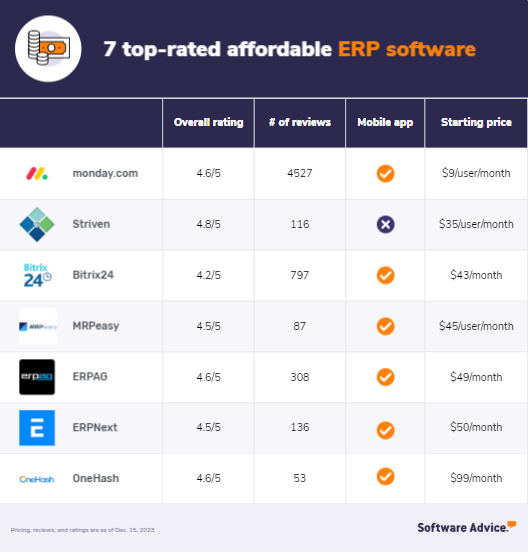
In a recent report, SoftwareAdvice, a leading software review site owned by Gartner, named Striven in its flagship report covering the top-rated and most affordable ERP software solutions in 2024.

This list of software solutions was created in large part by user feedback, as well as the affordability of each system. Striven was ranked #2 on this list behind only project management software Monday.com.

*Note that while Striven does not have a mobile app, it is a webapp that is easily usable on any mobile device.

Here is what the SoftwareAdvice analytics team had to say about Striven:

“Striven’s comprehensive ERP capabilities make it suitable for businesses looking to give customers, clients, and vendors the flexibility to manage their data. They can add or update information and download required documents at their convenience. The tool allows users to raise support tickets for their queries and concerns. Users can raise tailored invoices directly from the platform and share them with concerned parties via email or dedicated portals.”

Here’s one of our customer reviews that was factored into Striven’s placement on this list:

I like the collaboration tool it was really very useful to keep everyone on the same communication channel. I can share documents, discuss ideas and solve problems very quickly.” ~Ana

Want to read more? You can check out the original article right here: 7 Top-Rated Affordable ERP Software

Adopting Workflow Automation to Reduce Manual Efforts Efficiently

In the face of swift technological evolution, agility – the ability to adapt promptly to market variations and evolving customer needs – has become more than a strategic advantage. It is now a business essential, integral to the survival and success of organizations. The principle that bolsters this nimbleness is workflow automation. Through this, businesses can streamline manual efforts, enhance efficiency, minimize errors, and imbue organizations with the resilience they need to excel.

Workflow Automation Demystified

Workflow Automation (WFA) incorporates the planning, executing, and automating of business operations where tasks, information, or documents transit from one participant to another based on a specific set of rules; much like a relay race. This transformative approach transmutes conventional business processes into systematic, tech-driven functions that liberate employees from the monotony of trivial tasks, focusing instead on their areas of expertise.

For example, an organization can automate a workflow for employee onboarding. As soon as a new hire is registered in the HR system, it triggers actions across multiple departments – ID assignment from IT, training schedule from the learning and development team, and benefits enrollment details from HR. Additionally, they can utilize virtual training videos and use an MP4 compressor to optimize them before they are distributed to employees. This minimizes the storage requirements and facilitates faster streaming and downloads, contributing to a more streamlined and efficient onboarding process.

Agility Unleashed

Agile organizations are buzzing, thriving environments that warmly welcome change. Embracing workflow automation allows businesses to reach an agility level that permits them to:

  1. Adapt Swiftly: WFA empowers businesses to respond rapidly and aptly to business environment fluctuations by continuously tailoring processes to align with changing needs and strategies.
  2. Minimize Errors: Automated workflows significantly cut down manual involvement, which subsequently curbs human errors, thereby promoting accuracy, reliability, and consistency in business operations.
  3. Amplify Efficiency: It aids in the seamless transition of tasks across stages, ensuring zero time wastage.

Harnessing Workflow Automation: Maximizing Productivity & Minimizing Manual Efforts

Improving Resource Management: 

  • Prioritizing Essential Tasks: Workflow Automation (WFA) technology enables experts to devote more attention to high-value tasks by reducing their involvement in mundane, routine activities.
  • Boosting Morale and Productivity: When employees are allowed to concentrate on important tasks instead of monotonous work, their job satisfaction and productivity can significantly rise.
  • Fueling Innovation: As individuals are given more time to focus on broader, more complex problems, there is an increase in opportunities for strategic thinking and innovation, creating a more competitive, forward-thinking organization.

Analytics and Insights:

  • Data Analytics Capability: Automation tools have powerful analytics capabilities that can process and interpret large volumes of data, making them invaluable for any business.
  • Continuous Monitoring of KPIs: These tools keep a constant watch on Key Performance Indicators (KPIs) such as processing time, the status of tasks (both pending and completed), and productivity levels thus providing real-time updates.
  • Comprehensive Operational Overview: Through real-time monitoring and analytics, businesses gain a comprehensive, end-to-end view of their operations.
  • Agility in Strategy Modifications: By keeping track of the business’ pulse with real-time data, companies can readily adapt their strategies based on current operational status and future requirements, making them agile and responsive to changes.

Boosting Collaboration:

  • Transparency in Roles: Automated processes offer a clear understanding of individual tasks and responsibilities, ensuring every team member knows what to expect across various roles.
  • Effective Communication: By streamlining and automating processes, teams improve communication channels and make project management more efficient.
  • Responsibility Accountability: Automation promotes a sense of accountability for each task and reduces the chances of miscommunication or overlooked responsibilities.
  • Enhanced Teamwork: With a clear understanding of roles and smoother communication, teams can work together more effectively, share ideas, and achieve better results in a collaborative environment.

Scalability

  • Adaptable Workflows: Workflow Automation (WFA) can easily adjust to the changing requirements of a growing business, allowing for seamless expansions or contractions of workflows as needed.
  • Handling Peak Demands: During times of increased workload or peak demand, WFA enables businesses to quickly scale up operations without putting excessive strain on manual resources.
  • Minimal Effort Expansion: With WFA, companies can manage enhancements in their operations with minimal manual intervention, increasing efficiency and reducing operational costs.
  • Sustained Growth: By providing a flexible solution to accommodate varying workload levels, WFA fosters an environment where businesses can scale and support sustainable growth over time.

Capstone Effect of Workflow Automation: A Path to Economic Resilience

Businesses continue to chart unprecedented waters in the evolving corporate landscape. Economic resilience – the competence to withstand or recover quickly from difficult conditions, is the new gold standard for modern businesses. WFA, with its potential to minimize manual efforts, streamline operations, enhance collaboration, and promote swift adaptations, is set to play an indispensable role in building resilient businesses.

For instance, during the COVID-19 pandemic, businesses with automated workflows were able to transition to remote working and maintain operational continuity swiftly.

The Future Beckons: Embracing Workflow Automation for an Agile Tomorrow

Unlike ever before, dependable agility is envisioned to rise as the pulsating heartbeat of each prospering and growing enterprise, especially when venturing into the boundless expanses of the corporate universe. In this vast realm, where constant change is as much a challenge as an opportunity, the driving force that propels forward momentum while ensuring flexibility is Workflow Automation (WFA).

Redefining speed and efficiency, WFA serves as the sector’s compass, stringing together a rich tapestry of myriad benefits – these range from decreased costs and human errors to improved productivity and redundancy elimination. To encapsulate it all, WFA acts as the cornerstone, integral to the unwavering purpose of reinforcing an organization’s agile muscles.

Consider, for example, a global retailer with intricate supply chains, a vast number of products, and diverse consumer trends. The introduction of WFA techniques, like predictive AI for inventory management or automated analysis for customer behaviors, fosters a new breed of agile organizations that are responsive to both macro-market trends and micro-consumer behaviors.

Structural digitization under WFA is about more than just hardening the foundation – it is about reinforcing the very skeletal framework of the organization’s operational strength. Harnessing the power of automation, businesses can construct a robust mesh of technology and innovation, bound together by the steely resolve to stay ahead in the face of adversity.

Moving ahead, we are paving the way for organizations looking forward to their journey toward an agile tomorrow. In this digitized future, they are not only prepared to embrace change, but they are also primed to anticipate it, chart the course of their journey, and successfully navigate it with assurance and precision. This digital transformation journey is about much more than survival – it’s about thriving and leading the way in a fluid and fast-paced corporate cosmos.

Conclusion

It is imperative to realize that workflow automation doesn’t just stand as a productivity enhancer. Instead, it serves as a strategic fulcrum pivoting businesses towards a future marked by heightened efficiency, unwavering agility, and robust resilience. Embracing workflow automation isn’t just about adopting a revolutionary tool but accepting a gateway to possible future success and an opportunity to contribute to a more nuanced, interconnected, and harmonious workspace.

Striven’s Winter 2024 Triumph: G2.com’s ERP Standouts Unveiled

We are thrilled to share that Striven has once again demonstrated its prominence in the ERP sector, marking a significant achievement in the Winter 2024 ERP Awards on G2.com, a renowned platform for business software evaluations. This recognition is a reflection of not only our groundbreaking technology but also the commitment of our devoted team and the continuous support from our valued customers.

G2.com, every quarter, shines a spotlight on the industry’s leading solutions, as voted by the most crucial judges: our users.

Let’s celebrate our remarkable accomplishments for Winter 2024:

  1. Best Results, ERP Winter 2024: Striven leads the way, showcasing our exceptional outcomes in the ERP domain.
  2. Small Business High Performer, Americas, ERP Winter 2024: In the small business category, we’ve outperformed many, attaining a prestigious ranking.
  3. Momentum Leader, ERP Winter 2024: Demonstrating our dynamic progress in the ERP field, we’ve secured a leading position.
  4. High Performer, Americas, ERP Winter 2024: Our performance in the Americas region has been recognized, earning us a top spot.
  5. Mid-Market High Performer, Americas, ERP Winter 2024: Among mid-market players in the Americas, Striven has emerged as a high performer.
  6. High Performer Mid-Market, ERP Winter 2024: In the mid-market segment, our performance has been outstanding, securing us a notable position.
  7. High Performer, ERP Winter 2024: Across the board, Striven has been acknowledged as a high performer in the ERP landscape.

These accolades on G2.com directly mirror the Striven team’s perseverance, innovation, and hard work. More crucially, they highlight the invaluable input, confidence, and collaboration from our user base and customers. Your reviews, testimonials, and constructive criticisms have been pivotal in our incredible journey.

We are dedicated to continually redefining the capabilities of an ERP system. The road ahead is filled with more innovation, enhanced functionalities, and increased support to optimize your business operations. Anticipate more exciting updates, features, and advancements as we forge ahead together.

To our customers, partners, and the entire Striven family – your involvement in this remarkable journey is greatly appreciated. Here’s to many more milestones, triumphs, and mutual growth!